

SaniTrend ® Local Data+
Local Data Collection & Reporting
SaniTrend® Local Data+ captures cleaning cycle data and HMI audit trail data to support reporting, documentation, and review of critical cleaning process information.
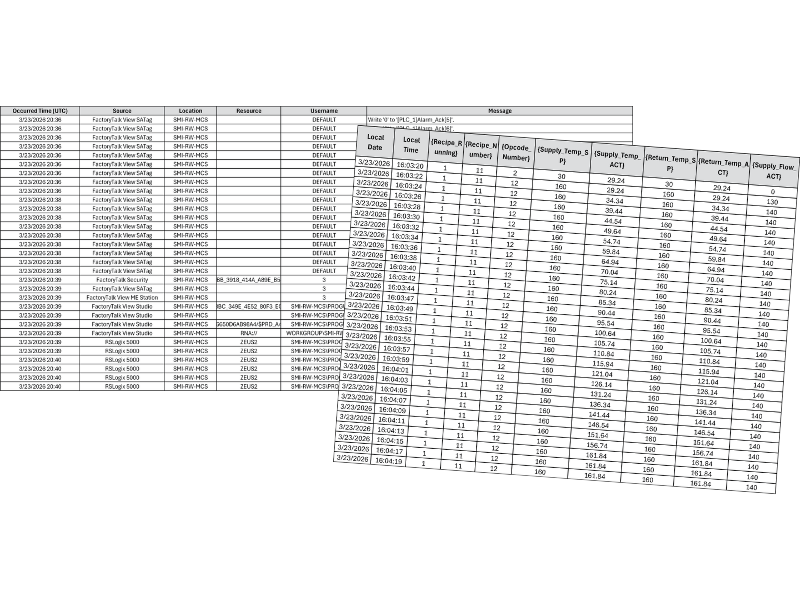
SaniTrend® Local Data+ uses an industrial PC mounted inside the control panel to store cleaning cycle and HMI audit trail files. These files are automatically exported to the industrial PC as .csv files.
Once the files are on the industrial PC, they can be retrieved from other devices on the system’s network.
Cleaning cycle files are exported when a cleaning cycle runs. HMI audit trail files are exported at the end of a cleaning cycle or when other key events occur. If selected, data transfer verification is included in the FAT protocol.

Features

Automated Data Capture

Local to Facility Solution

Critical Analog Cleaning Cycle Data

HMI Audit Trail (21 CFR Part 11 Compliance)
What Does SaniTrend® Local Data+ Capture?
Cleaning Cycle Data
Cleaning cycle data is exported when a cleaning cycle runs. This data helps provide a record of critical cleaning conditions, including values such as conductivity, temperature, and flow/pressure.
Cleaning cycle data may include:
- Cleaning cycle date and timestamps
- Critical analog values and setpoints
- Conductivity
- Temperature
- Flow / pressure
- Other available values based on the system’s instrumentation
Available values depend on the equipment’s instrumentation and system configuration.
HMI Audit Trail Data
HMI audit trail data shows user activity and system changes. This can include user information, when data was changed, and what changes were made. Audit trail data is exported at the end of a cleaning cycle or when other key events occur.
HMI audit trail data may include:
- User information
- When data was changed
- What data was changed
- Key operator or system events
Available values depend on the equipment’s instrumentation and system configuration.
File Export and Retrieval
After export, cleaning cycle and HMI audit trail files are stored as .csv files on the industrial PC. These files can be accessed from other devices on the system’s network for review, storage, or additional processing.
Retrieval, organization, storage, and long-term management of the exported files are the responsibility of the end user.
How Does It Work?
SaniTrend® Local Data+ works through the system’s PanelView™ Plus 7 graphic terminal and an industrial PC mounted inside the control panel.
Operating Requirements
Minimum system requirements: Sani-Matic automated cleaning system with PLC controls, Allen-Bradley® CompactLogix™ or higher PLC processor, and PanelView™ Plus 7 graphic terminal running version 10 or higher of the FactoryTalk® View Machine Edition (FT View ME) application.
Sani-Matic provides an industrial PC mounted inside the control panel for exported .csv file storage.

Click below to open the SaniTrend ® Local Data+ Technical Datasheet in a new tab to review or download directly.